TL;DR: When my work laptop started dropping video meetings and crawling on VPN in my home office, my personal laptop on the same desk was performing fine. I escalated through every complex hypothesis—OS update issues, laptop hardware failure, and ISP throttling—until the ISP diagnosed a faulty gateway. Replacing it tripled my speeds across the house, leading me to believe the problem was solved. But Monday morning, the drops returned. The real culprit? A localized “Wi-Fi shadow” created by nearby metal shelving and a printer, which blinded my laptop antenna array until I moved it just two inches. It was a textbook lesson in the danger of concurrent faults and environmental red herrings.
Few things are as instantly disruptive to remote work as an unstable internet connection.
It started innocuously: audio stuttering during Google Meet sessions, freezing Zoom screens, and VPN timeouts. To stay in meetings, I found myself repeatedly disabling my video just to preserve the audio stream.
Yet the failure had baffling boundaries. My personal laptop and smartphone, resting on the very same desk in my home office, pulled clean bandwidth without breaking a sweat.
My initial troubleshooting followed the typical engineering escalation path:
- Did a recent OS update introduce power-saving bugs into the Wi-Fi drivers?
- Was my work laptop’s wireless card failing under load?
- Was the ISP throttling encrypted corporate VPN and real-time streaming traffic?
Then came the first contradictory data point: when I took my work laptop downstairs to the family room, it stayed connected without dropping packets. The bandwidth was lower due to the distance from the router, but the connection remained rock-solid.
The Real Problem That Was Still a Red Herring
I contacted my ISP. Their remote line diagnostic flagged anomalies and errors on my gateway-modem, prompting the technician to recommend a hardware swap.
On Friday evening, I picked up a replacement unit and provisioned it. The numbers were immediately impressive: local throughput on my personal laptop jumped from ~600 Mbps to over 2,100 Mbps. Over the weekend, the family room setup delivered 500+ Mbps compared to the usual 200 Mbps.
The data seemed definitive: the hardware had been swapped, system throughput had tripled, and testing in the living room showed no latency spikes. The ticket was closed.
Then came 9:00 AM Monday.
I sat down in my home office, dialed into my first standup, and the connection instantly dropped.
The Diagnostic Spiral
At this point, confirmation bias kicked into overdrive. Because the network backbone had just been validated, the blame fell squarely back on the work laptop’s Wi-Fi hardware. I ran system diagnostics, checked event logs, and found nothing actionable.
Meanwhile, an auxiliary data point sat unexamined. In another room, I maintain a secondary backup Wi-Fi connection (“ExtraWifi”) from a different provider. Whenever my primary office Wi-Fi crashed, I could switch over to ExtraWifi and maintain a stable—if slightly slower—connection.
Why would my work laptop fail only on the primary office Wi-Fi, only inside the office, while every other device on the desk thrived? Did the new gateway broadcast on a frequency band that interacted poorly with the corporate laptop’s network adapter?
Frustrated, I wondered if the machine was thermally throttling and causing the internal radio to stall. I leaned over, grabbed the sides of the laptop, and moved it roughly two inches to inspect the cooling vents along the chassis.
Instantly, the Wi-Fi icon stabilized, packet loss dropped to zero, and bandwidth snapped back to maximum throughput.
The 2-Inch RF Shadow
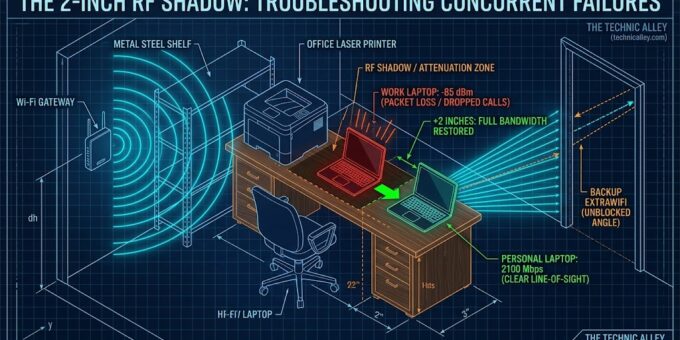
My laptop had been sitting in a hyper-localized radio-frequency dead zone.
Modern high-speed Wi-Fi relies heavily on 5 GHz and 6 GHz bands. While these frequencies deliver immense throughput, their shorter wavelengths (~5–6 cm) make them susceptible to sharp physical attenuation and reflection.
Near my desk sits a steel shelving unit holding office equipment, including a laser printer with internal metal shielding. Sometime earlier that week, an object on the shelf had shifted, or the laptop had been nudged into a localized “shadow zone.” The metal obstructions attenuated the line-of-sight signal from the primary gateway, creating a miniature dead pocket on my desk.
My personal laptop, sitting just inches away, had clear line-of-sight reception. The backup Wi-Fi worked because its access point was located in a completely different room, arriving from an unblocked angle. And the family room worked because the signal path bypassed the office shelving entirely.
The Trap of Concurrent Faults
This was a classic case of concurrent independent failures.
The gateway was underperforming and needed replacement—the 3x speed increase proved the ISP’s diagnostic was accurate. But fixing an actual system defect masked the separate physical obstruction that was the true root cause of the meeting drops.
Much like my earlier experience with The 6-Inch System Failure, where an optical failure turned out to be an unrecognized chair height adjustment, this was another reminder of our bias toward complex technical failures over simple physical geometry.
When your connection drops, by all means check your drivers, power-cycle your gateway, and audit your ISP. But before you condemn your hardware, try moving your laptop two inches to the left.